Setting up a sending domain means publishing seven DNS records: three DKIM CNAMEs, SPF for the zone apex and for the bounce subdomain, an MX on the bounce subdomain so bounces come back, and a DMARC policy. Receiving mail with SMTPfast adds one more, the MX on the host you receive on. Each is a copy from our dashboard into your DNS provider's form, and a stray space or a proxied CNAME is enough to keep a domain unverified.
Domain Connect removes the copying. It is an open standard, published by the Domain Connect group, that lets a service such as SMTPfast describe its records in a template and lets a DNS provider apply that template to your zone after you approve it on the provider's own screen. Cloudflare supports it, and both SMTPfast templates are onboarded there: one for sending, one for the inbound MX, each with its own approval.
What you click
For a sending domain on Cloudflare, the domain page offers Connect Cloudflare alongside the record list. Click it and a Cloudflare tab opens with the records already filled in: the DKIM CNAMEs, SPF for the apex and the bounce subdomain, the MX for bounce handling and a DMARC policy. Approve, and Cloudflare writes them. You land back on SMTPfast, which refreshes the DNS status; verification completes once the records have propagated and Amazon SES has confirmed them.
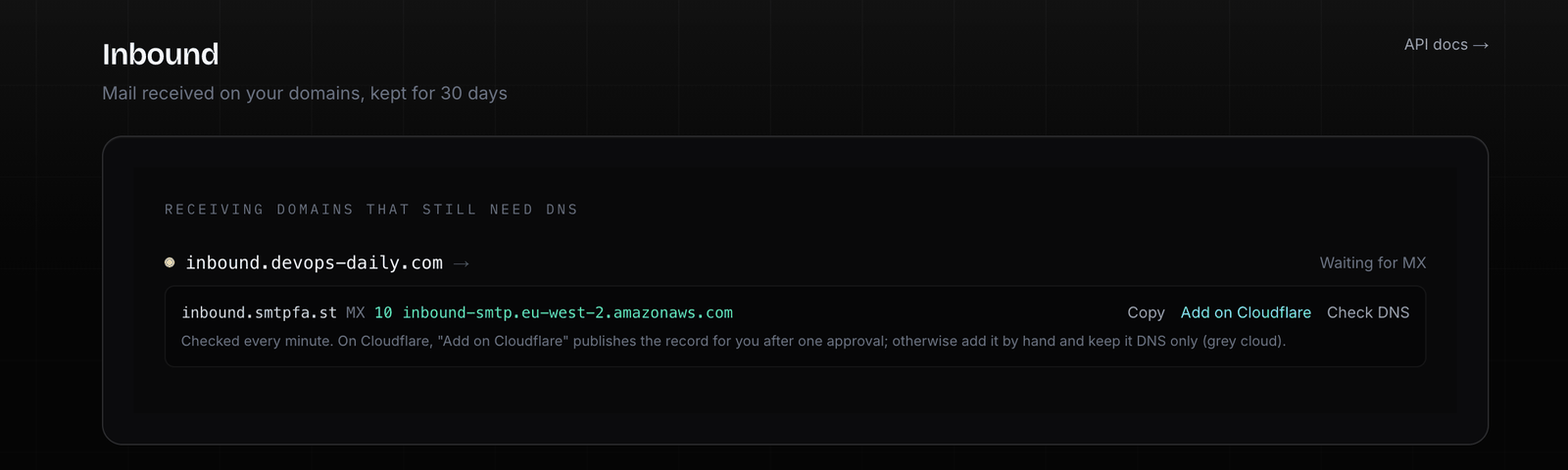
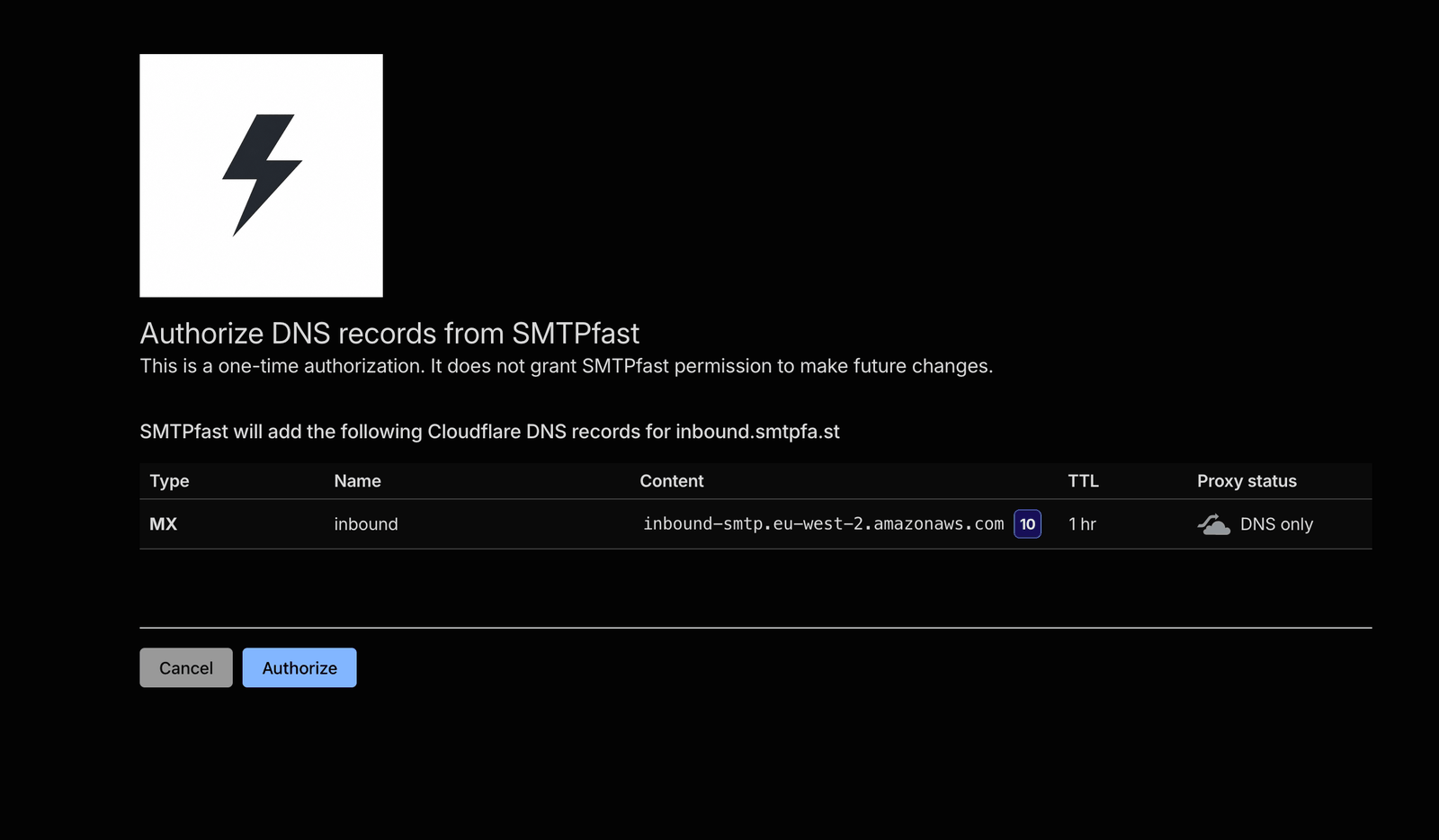
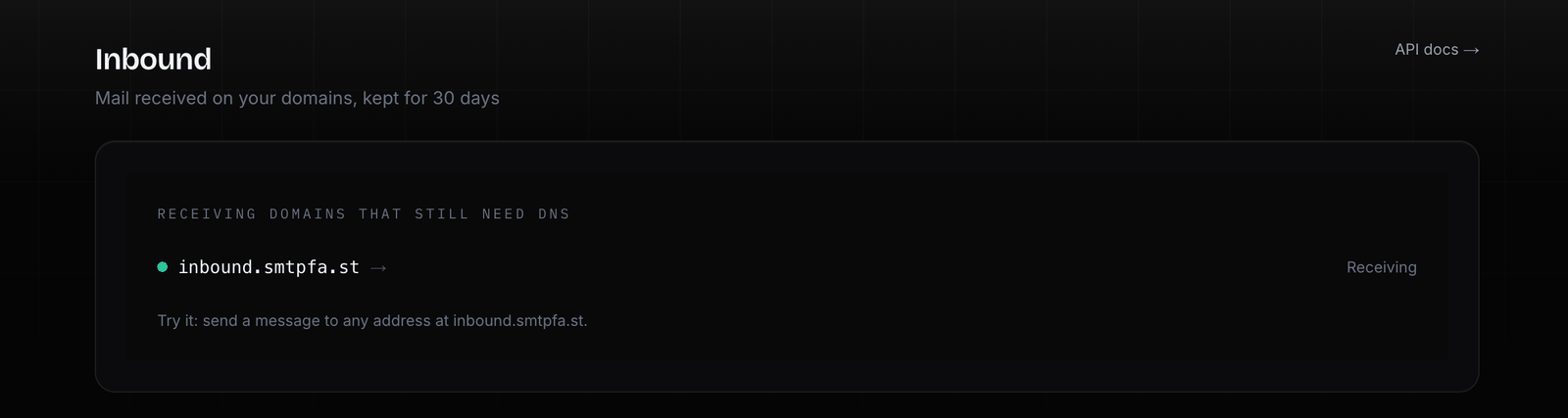
For inbound receiving, the Inbound page shows Add on Cloudflare next to a receiving domain on a Cloudflare zone that is still waiting for its MX. Same flow, one record: the MX pointing at the SMTPfast receiving endpoint for the platform's receiving region, priority 10. Approve on Cloudflare, come back, and the page rechecks the record right away. Receiving itself needs a paid plan and a verified domain, as before.
What gets written, exactly
SMTPfast maintains two templates in the public Domain-Connect/Templates repository, so you can read the records before you ever click approve.
smtpfa.st / mail declares the sending records:
- three
CNAMErecords for DKIM, one per selector, pointing at Amazon SES, - SPF for the zone apex and for the bounce subdomain. These use Domain Connect's SPF merge, so
include:amazonses.comis added to an SPF record you already have rather than replacing it, MX 10 feedback-smtp.<region>.amazonses.comon the bounce subdomain, so bounces come back to SES,- a
TXTrecord at_dmarcwithv=DMARC1; p=none; adkim=r; aspf=r; rua=mailto:postmaster@<your domain>. If you already run a DMARC policy, read that line on the approval screen before you approve.
smtpfa.st / inbound declares one record: MX 10 inbound-smtp.<region>.amazonaws.com on the receiving host, which can be the zone apex or a subdomain such as mail.example.com.
Those are the records each template asks for, and the approval screen lists what will be written. If something does not look right, close the tab before approving and nothing is changed.
Why the inbound MX is its own template
The MX for receiving deserved a separate template rather than a line in the sending one. An MX at the zone apex can redirect mail, or compete with the mail service the domain already uses, depending on priorities. Bundling it with the sending records would have meant that a customer who only wanted DKIM and SPF was approving a change to where their company mail goes. Keeping it separate means you ask for the MX explicitly, on the Inbound page, for the host you chose.
The same logic applies inside the template: the record is scoped to the host you enable receiving on. Enable mail.example.com and the MX lands on mail.example.com; your apex mail is untouched.
How the request is signed
A Domain Connect apply link carries the record values as parameters (the domain, the DKIM selectors, the region, the bounce host, and where to return to) and an RSA-SHA256 signature over that canonical query. SMTPfast signs each link with a private key whose public half is published in DNS at _dcpubkeyv1.smtpfa.st, and the provider checks the signature against it. A link edited in flight to point your DKIM at someone else's selectors fails that check, and a link built for one domain does not verify for another.
The links also carry a return address, so after approval Cloudflare sends you back to the SMTPfast page you started from. On the domain page that triggers a verification; on the Inbound page it triggers the MX check.
When your DNS is not on Cloudflare
SMTPfast detects the DNS provider from the domain's nameservers, and automatic setup is available for Cloudflare today. Everywhere else the dashboard shows the records to copy, with a Copy button per record. The API returns the records for manual setup: GET /v1/domains/{id} lists the sending records (its DMARC suggestion is the minimal v=DMARC1; p=none;), and the same response carries receiving.mx_record once receiving is enabled. Pending inbound MX records are rechecked about once a minute; sending verification rechecks on a schedule that stretches as the domain ages, and you can trigger a check from the domain page at any time.
Two details save time on any provider. Keep the DKIM CNAMEs DNS only: a proxied CNAME (the orange cloud on Cloudflare) hides the target SES expects to find. And make sure our MX is the only record at the lowest-numbered priority for a receiving host; a competing MX at the same or a lower value takes a share of the mail and the domain shows as failed. Give the other record a higher number or remove it.
If your provider supports Domain Connect and you would like the SMTPfast templates there, tell us which one; onboarding is a pull request to the templates repository plus a provider-side approval.
Where to read more
- Domains docs: the sending records, verification, and the Cloudflare flow.
- Inbound docs: receiving setup, the API and the
email.receivedwebhook. - The templates themselves: smtpfa.st.mail.json and smtpfa.st.inbound.json.
Ready to get started?
Start sending transactional email today. Free to start, no credit card required.
Get Started for FreeRelated Posts
How to Send Email From Your AI Agent: Claude, Codex and Cursor With MCP
Let your AI agent send email over MCP: connect Claude Code, Claude Desktop, Codex or Cursor to SMTPfast, with exact configs, real runs and a safe key setup.
The Best Free SMTP Services for Developers in 2026
Ten free SMTP services compared for apps, CMSs and devices: free-tier limits, daily caps, ports and TLS. Every number checked on the provider's own pages.